Dyno Garage

Engine Sim
Rev 28 real engines by touch. Shift, clutch, tune.
Download Engine Sim APK, the free ~29 MB engine sound simulator for Android. Twenty-eight engines, from a 660cc turbo kei car to a W16, all synthesized live under your fingertip. Tap the throttle, work the clutch, row the gears.
This is the official download source for Engine Sim. Every build is scanned and installed on real test phones before the download button goes live, and this page always describes the exact file you are getting.
XAPK
Format
~29 MB
XAPK size
28
Engines
4.7/5
1,718 ratings
On this page
Spec sheet
App Information
- App Name
- Engine Sim Sound Simulator
- Version
- v1.8.11
- Package
com.tdynamics.enginesim- File Size
- ~29 MB (XAPK)
- Requires Android
- 7.0 and up
- Category
- Simulation
- Developer
- Takasawa Dynamics
- Price
- Free (contains ads)
- Rating
- 4.7/5 (1,718 ratings)
Inside the app
Engine Sim Screenshots
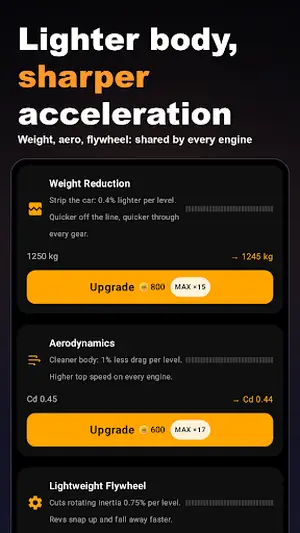
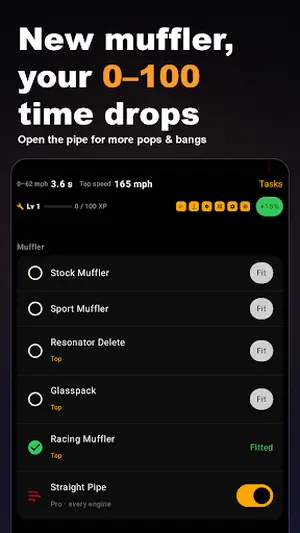
The machine
What Is Engine Sim?
Engine Sim (EngineSim) is an engine sound simulator for Android that puts 28 car engines in your pocket. You pick an engine, tap the throttle, and the phone plays a live synthesized engine note that follows your finger, from a sleepy idle to a screaming redline. Nothing is a recording: the sound is generated in real time from each engine's layout, so it reacts the way a real motor would.
The Engine Sim APK on this page is packaged as a ~29 MB XAPK. It covers everything from a 660cc turbo kei car to a W16 flagship, with a working gearbox, a clutch pedal, and tuning screens for exhaust and sound. If you have ever wondered what a big-torque V8 or a 19,000 rpm V10 sounds like at full chat, this is the cheapest dyno you will ever visit.
This site is the official download source for the file below. Every build is scanned and installed on real test phones before the download button goes live, and the file you get is always the exact build described on this page.
The lineup
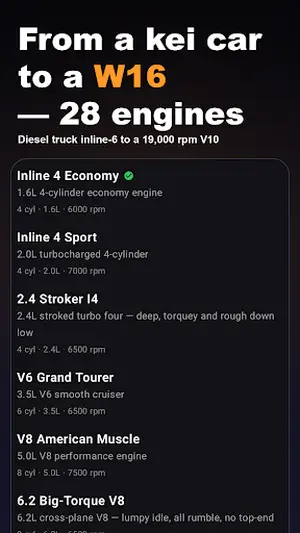
28 Engines on the Rack
Every engine in the current build, grouped by character. Pick your poison.
| Engine | Layout | Character |
|---|---|---|
| Inline 4 Economy | 1.6L 4-cylinder | Mild commuter, calm idle, 6,000 rpm ceiling |
| Inline 4 Sport | 2.0L turbo 4-cylinder | Punchy midrange, 7,000 rpm redline |
| 2.4 Stroker I4 | 2.4L stroked four | Deep, torquey and rough down low |
| V6 Grand Tourer | 3.5L V6 | Smooth cruiser, 6,500 rpm |
| V8 American Muscle | 5.0L V8 | Classic rumble, 7,500 rpm |
| 6.2 Big-Torque V8 | 6.2L cross-plane V8 | Lumpy idle, all rumble, no top end |
| Flat-6 Boxer | 3.8L flat-six | Wailing sports car note, 8,200 rpm |
| V10 High-Rev | 5.2L V10 | Formula-style scream, 9,000 rpm |
| V10 19K | Race V10 | 19,000 rpm insanity, ear protection advised |
| W16 Flagship | 8.0L W16 quad-turbo | The full orchestra, 6,800 rpm |
| Rotary 13B | 1.3L twin-rotor | Buzzing rotary wail, 9,500 rpm |
| Diesel Inline-6 | 3.0L diesel six | Clattery torque monster, 4,500 rpm |
The list above covers the headline acts. The full EngineSim garage also includes kei turbos, economy fours, turbocharged sixes, and a handful of oddballs the developer keeps adding. Each one gets its own idle character, throttle response, and redline, so switching engines genuinely feels like switching cars.
The toolkit
Key Features of This Build
Everything below describes the XAPK hosted on this page, verified on our own test phones.
28 Synthesized Engines
From a 660cc kei turbo to a W16. The sound is generated live from each engine's behavior, not played back from recordings.
Three Gearbox Modes
Row your own with the manual gate, tap through with paddles, or let the automatic handle it. MT, paddle, and AT all included.
Working Clutch Pedal
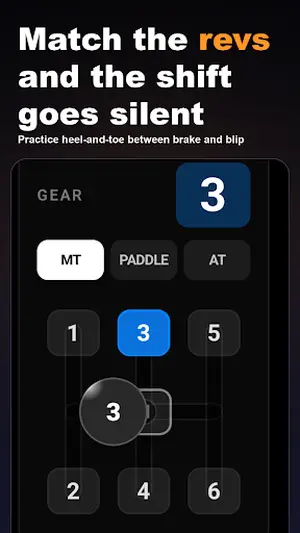
A real clutch pedal on screen. Practice heel-and-toe between brake and throttle blip, and the shift goes silent when you match the revs.
Exhaust and Sound Tuning
Change the exhaust and tuning in Settings and compare the note from idle to redline on any engine.
Live Tachometer
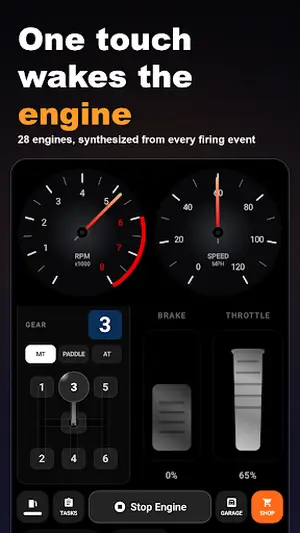
A proper RPM dial that follows your throttle finger, with a gear display that keeps up with your shifts.
No Account Needed
Open the app and rev. No sign-in, no account creation, no waiting rooms before the fun starts.
Driver briefing
How the Sim Works
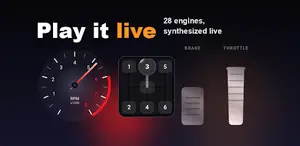
Open EngineSim and you get a dashboard: tachometer on the left, gear selector in the middle, brake and throttle pedals on the right. Put your finger on the throttle and push. The revs climb, the synthesized note follows, and when you lift off, fuel cut kicks in and the revs fall, just like a real engine on overrun.
Shifting is the real game. In manual mode you drag the lever into gear while working the clutch pedal. Time it right and the shift is seamless. Get it wrong and the engine bogs or flares, and the app lets you hear exactly why. The paddle mode is more forgiving, and the automatic is there for pure revving sessions.
The sound tuning screens let you swap exhausts and tweak the note. A short exhaust barks, a long one drones, and each engine keeps its own personality through every combination. It is the closest thing to a dyno cell that fits in a phone.
Changelog
What Is New
The latest build refines throttle response across the rev range with cleaner sound transitions between idle and redline. The engine select screen loads faster, and the shift logic in manual mode is more forgiving on downshifts.
If you are coming from an older build, your engine picks carry over. Install the new XAPK over the old one and you keep everything. The update guide walks through the two-minute process.
Install guide
Install It in Five Minutes
Safety check
Is Engine Sim Safe?
Yes, with the usual common sense. The XAPK on this page is scanned with multiple antivirus engines before every publish, and our reviewer installs it on real test phones and runs it before the download button goes live. The app asks for storage access (to read its sound data) and nothing exotic.
Two honest notes. First, the app contains ads, which is how the free build pays its way. Second, only install the file from this page or the official listing. Random re-uploads of the engine sim apk floating around the web are where the actual risk lives, not in this build. The safety breakdown covers permissions and ad behavior in full.
Fitment
Phones It Runs On
| Requirement | Detail |
|---|---|
| Android version | 7.0 and up |
| Free space | ~120 MB during install (file plus unpacked data) |
| RAM | 2 GB or more recommended for smooth audio |
| Sound | Any speaker works; a Bluetooth speaker or car stereo sounds far better |
| Internet | Needed for ads only; the sim itself runs offline |
If your phone runs Android 7 or newer with a working speaker, you are in. Older budget phones still run it, but the audio engine appreciates a bit of headroom. The requirements guide has the full checklist.
Specs
Technical Details
| Spec | Value |
|---|---|
| Package name | com.tdynamics.enginesim |
| Version | 1.8.11 |
| File format | XAPK (APK bundle) |
| File size | ~29 MB |
| Developer | Takasawa Dynamics |
| Category | Simulation |
| Content rating | Everyone |
| Price | Free (contains ads) |
Support
Common Issues, Quick Fixes
Fix 1
No sound at all
Check the media volume (not the ring volume), disconnect Bluetooth, and confirm the app has storage permission. The no-sound guide fixes 9 out of 10 cases.
Fix 2
XAPK will not install
Use an XAPK installer app, allow installs from it, and confirm the full ~29 MB downloaded.
Fix 3
Crackling audio
Close background apps and lower the in-app sound quality one notch in Settings.
Fix 4
App closes on launch
Clear the app cache once, or reinstall the XAPK fresh over the old copy.
Still stuck after those? The install fix guide and the no-sound guide go deeper, step by step.
Assessment
The Honest Scorecard
What shines
- 28 distinct engines with real character, from kei turbo to W16
- Live synthesized sound that reacts to throttle, not canned recordings
- Proper manual gearbox with a working clutch pedal
- Exhaust and tuning options change the note audibly
- Free, no account, runs offline
What needs work
- Contains ads in the free build
- XAPK format needs a separate installer app
- No real driving or racing mode, it is a sound toy
- High-rev engines can distort on weak phone speakers
Pit crew answers
Engine Sim FAQs
The questions our inbox sees most about the Engine Sim APK, answered straight.
What is Engine Sim APK?
It is the Android install file for EngineSim, an engine sound simulator with 28 synthesized car engines, manual shifting, and a working clutch pedal. This page hosts the latest verified build as a ~29 MB XAPK.
Is Engine Sim free?
Yes. The app is free and contains ads. No account or sign-in is required to use any of the 28 engines.
What is an XAPK file and how do I install it?
XAPK is a bundle format that holds the APK plus its data files. Install it with any XAPK installer app from the Play Store: open the installer, select the downloaded enginesim.xapk, allow installs from that source, and tap install.
Are the engine sounds real recordings?
No. Every engine note is synthesized live from the engine's layout and behavior, so the sound reacts to your throttle, shifts, and clutch work in real time.
How many engines are in Engine Sim?
The current build ships with 28 engines, from a 660cc turbo kei car and economy fours up to V8s, a V10, a rotary, a diesel six, and a W16 flagship.
Why is there no sound in Engine Sim?
The usual causes are muted media volume, an active Bluetooth connection routing audio elsewhere, or a missing storage permission. The no-sound guide on this site walks through each fix.
Does Engine Sim work on iPhone?
No. EngineSim is Android-only. iPhone owners need a different app; there is no iOS build of this simulator.
Is Engine Sim safe to install?
The build on this page is scanned with multiple antivirus engines and installed on real test phones before the download button goes live. It requests storage access for its sound data and shows ads, which is normal for a free app.
Can I use Engine Sim with a Bluetooth speaker?
Yes, and it sounds far better that way. Pair the speaker first, then open the app. If audio still comes from the phone, toggle Bluetooth off and on once.
Which Android version does Engine Sim need?
Android 7.0 and up. Any phone from the last several years with a working speaker runs it fine.
Final inspection
Final Verdict
EngineSim does one thing and does it with genuine craft: it makes your phone sound like 28 different engines, live, under your finger. The synthesized audio is the star, reacting to throttle lifts, clutch work, and gear changes in ways that recordings never could. The manual gearbox with a real clutch pedal turns revving into a skill you can practice, and the tuning screens give every engine a second personality.
It is not a racing game and it does not pretend to be one. If you want lap times, look elsewhere. But if you are a car person who has ever blipped a throttle in a tunnel just to hear it, this little dyno belongs on your home screen. The XAPK on this page is scanned, tested on real phones, and ready to rev.